Tynker Review




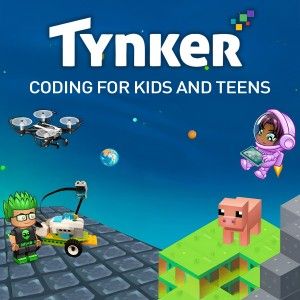
Tynker is a creative learning platform designed to introduce kids and beginners to the world of coding, logic, and interactive digital creation. For many parents, educators, and young learners, it has become a go-to tool for developing computational thinking through fun and engaging projects. With a combination of block-based coding and real programming languages like Python and JavaScript, Tynker caters to a wide range of skill levels and learning goals. Whether you want to download it for home learning or integrate it into classroom instruction, Tynker strikes a strong balance between education and entertainment.
Learn to Code Through Play
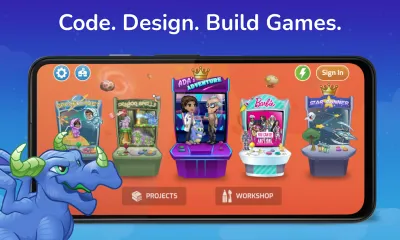
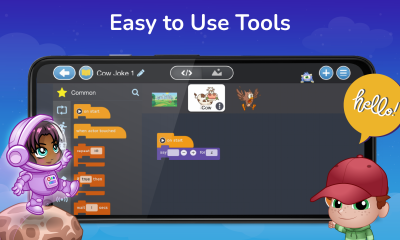
Tynker’s core philosophy is that coding should feel like play rather than work. From the moment you launch the app, you’re greeted with colorful animations, game-like coding lessons, and guided challenges that gradually ramp up in complexity. The interface uses visual blocks that snap together, which makes it easy for beginners to understand programming logic without being overwhelmed by syntax.
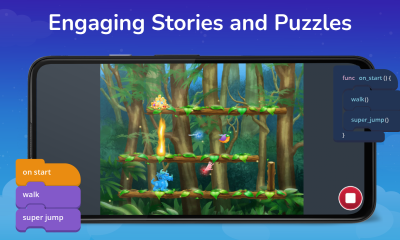
As learners progress, Tynker introduces more advanced concepts through tutorials and campaigns that involve building games, animations, and interactive stories. This progression from simple drag-and-drop commands to real text-based coding helps bridge the gap between visual logic and serious programming skills.
Features That Empower Creativity
Tynker is packed with features designed to foster creative problem-solving and experimentation. Highlights include:
- Step-by-step coding lessons with increasing difficulty;
- Creative coding sandbox for building custom games and projects;
- Integration with Minecraft, robots, drones, and IoT devices for hands-on learning;
- Support for Python and JavaScript when users are ready to transition from block-based logic;
- Interactive puzzles that teach core concepts such as loops, conditionals, and variables;
- Seasonal and themed challenges tied to events or popular media.
This range of capabilities makes Tynker not just a coding tutorial app, but a platform where kids can design, build, and share their creations.
Visuals and Usability
Tynker uses a bright and engaging visual style that is appealing to younger audiences but not overly childish. Characters, icons, and interfaces are clean and intuitive, helping users navigate lessons and creative spaces with ease. The drag-and-drop mechanics are responsive, and the feedback system highlights coding errors in a supportive way that encourages learning rather than frustration.
The app also includes progress tracking, badges, and rewards, which help motivate learners to complete lessons and tackle challenges. Cloud sync allows users to switch between devices while retaining progress, making it easy to learn on the go.
Educational Value and Real-World Skills
What sets Tynker apart from many other “kids coding apps” is its structured curriculum that aligns with real educational standards. Parents and teachers can use built-in lesson plans and guides to support learning outcomes. For classrooms, the app offers teacher dashboards, student management tools, and analytics to monitor progress.
Beyond coding fundamentals, Tynker encourages computational thinking, logic sequencing, debugging practices, creativity, and even collaboration when users explore community projects. As learners advance, they are given real programming languages and tools that prepare them for further study in STEM fields.
Free Access vs Subscription
Tynker can be downloaded and initially used for free, giving access to basic lessons and introductory features. However, full access to the complete curriculum, advanced modules, Minecraft integrations, and cloud features typically requires a subscription. While this monetization model is standard for comprehensive learning platforms, it means that the best content is gated behind paid access. Still, many parents and educators find the cost worthwhile given the quality of instruction and range of features.
How to download and install Tynker
Tynker is available to download on multiple platforms including Android (via Google Play), iOS (via the App Store), and as a web app for desktops and laptops. Users can install the app freely, and registering an account allows synchronization of progress across devices. Full access typically requires a subscription that unlocks the complete library of lessons and advanced project types.
Supported platforms include Android tablets and phones, Apple iPhone and iPad devices, and web browsers on Windows and Mac. While there is no official standalone Chromebook app, the web version works smoothly on ChromeOS. There is no APK available outside official app stores, and installing unofficial APKs is not recommended.
To upgrade within the app, users can follow the in-app prompts to subscribe. Subscriptions may be billed monthly or annually depending on the chosen plan. System requirements are light—most modern mobile devices and desktop browsers from the past few years run the app without issues.
Because Tynker is designed for educational use, it can typically be used without being blocked on school or work networks. However, in rare cases where access is restricted, using a secure home network or approved VPN (where legally permitted) may help avoid blocks. Cloud sync ensures that projects and progress remain intact regardless of network changes.
Pros
- User-friendly coding lessons that make learning fun
- Covers both block-based and text-based programming
- Wide range of creative project types
- Integration with Minecraft and other interactive tools
- Progress tracking and rewards that motivate learning
- Useful for both home learning and classrooms
Cons
- Full content requires a subscription
- Some advanced features are locked behind paywalls
- Younger children may still need adult guidance
Screenshots